
Twelve Products to One Platform

Designing a shared direction and a connected experience
A UX vision for twelve security products that had never been asked to speak the same language.

My role
- Role
- Product Design Lead · DesignMap
- Duration
- 3.5 months
- Outcome
- Aligned teams around a shared platform direction and informed a cross-product development roadmap
Working under a design director, I led meetings and workshops and took a hands-on role in the concepting, design, and iteration of screens. My strongest contributions were research and developing the platform model we used to evaluate possible directions, working alongside a collaborator who owned the information architecture. The work helped move integration onto the roadmap, with engineering time allocated to connecting products across the portfolio.
The Brief
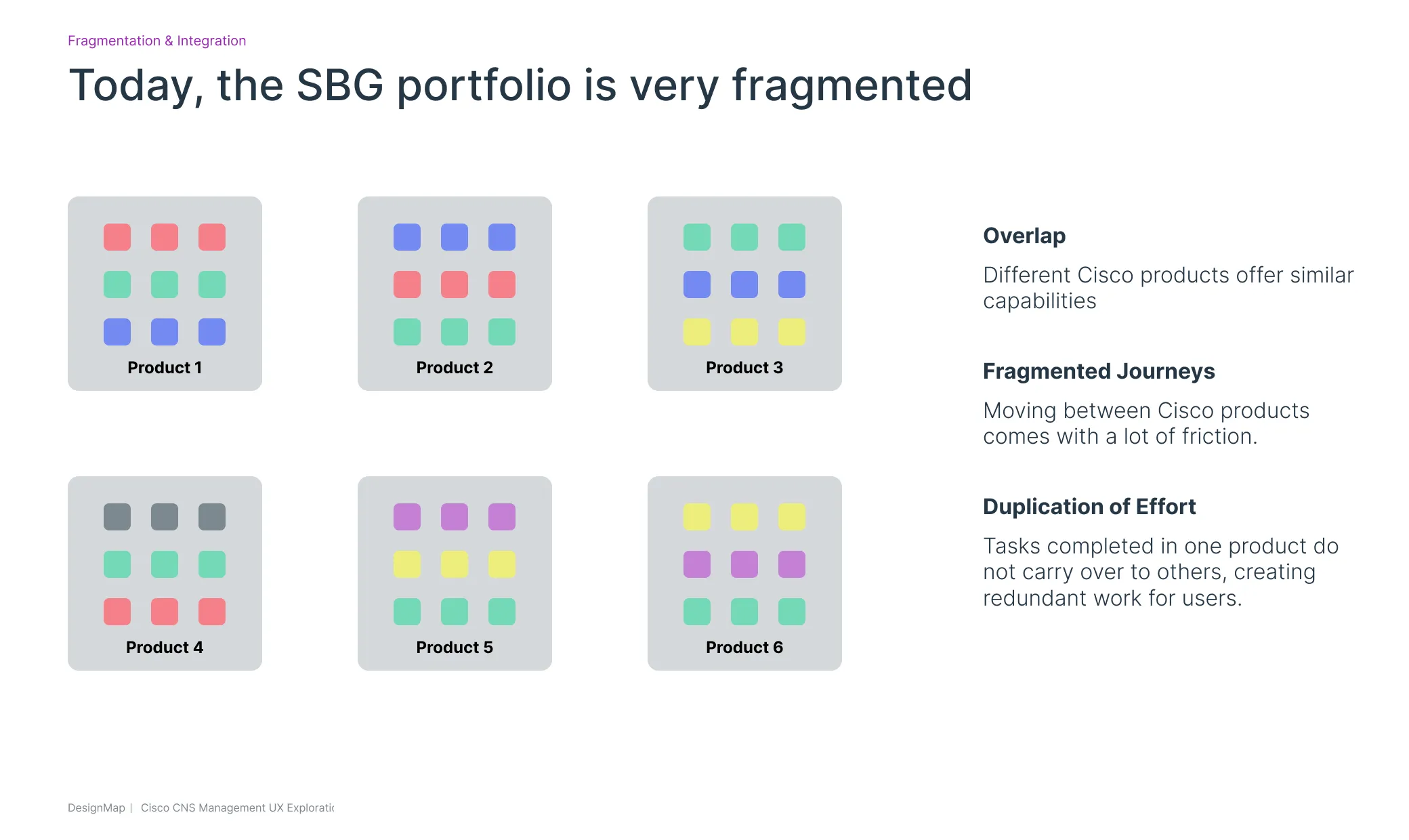
Cisco’s Security Business Group had a portfolio problem. Over the years, through acquisitions and siloed internal product initiatives, their “portfolio” had become a collection of 12 disparate tools that didn’t work together. Duo for multi-factor authentication. Umbrella for DNS-layer protection. Secure Endpoint for malware detection. SecureX for threat response and orchestration. Etc etc etc. Each product served a different use case in the fragmented security ecosystem, and at least on paper, they all rolled together into a product suite that addressed an organization’s primary security needs through a single vendor.
But in reality, each one was a completely separate world. Different UIs. Different navigation models. Different mental models for what a “user” or a “device” or a “network” even was. An IT admin securing a mid-sized organization wasn’t managing a security posture — they were context-switching between a dozen tabs, re-defining the same entities from scratch in each one, and creating their own duct-taped workflows, even between tools made by the same company.
DesignMap was brought in to design a UX vision for what it would look like if these products were one platform.
Slide 1 of 6
The Brief Behind the Brief
Yes, ostensibly, we were there to architect a portfolio, but between the lines there was a messier, and more human problem to solve: How to defuse the political tensions that arise when teams are forced to come together.
Each product team had spent years building its own identity, priorities, and roadmap. And now they were being asked to align around a shared platform, consolidate overlapping capabilities, and, in some cases, hand off functionality they’d built themselves. That required more than design work—it required collective thinking instead of the tribal instincts that were currently at play.
I think DesignMap was brought in partly because we could act as neutral facilitators. We weren’t tied to any one product, which let us ask difficult questions, surface tensions, and create the shared frameworks and language the teams needed to work together.
This is the kind of work I enjoy most. I’m comfortable in the messy front end of complex projects—learning the landscape, making sense of competing perspectives, putting words to uncomfortable tensions, and building enough shared understanding for people to move forward together.
Discovery: Learning a Portfolio
The first month was largely about getting smart. We ran product demos with teams from six of the main products — Duo, Umbrella, Secure Email, SecureX, Secure Endpoint, and the Frontizo/Meraki network security stack.
Each demo told a version of the same story: capable product, proud team, growing complexity. Duo was a particularly interesting case — originally built for multi-factor authentication, it had accumulated features over the years at customer request until it had grown into what the team themselves called an “amoeba.” More or less the same story played out across the portfolio.
| Product | Identity and Access | Endpoint Security | Network Security | Cloud Security |
|---|---|---|---|---|
| AMP | No | Yes | No | No |
| AnyConnect | Yes | Yes | No | No |
| CDO | No | No | Yes | Yes |
| DUO | Yes | No | No | No |
| FDM | No | No | Yes | No |
| FMC | No | No | Yes | No |
| ISE | Yes | No | No | No |
| Meraki | No | Yes | Yes | Yes |
| Secure Workload | No | No | Yes | Yes |
| SecureX | No | Yes | Yes | Yes |
| Stealthwatch | No | Yes | Yes | Yes |
| Umbrella | No | Yes | Yes | Yes |
Alongside the product demos, we ran stakeholder interviews across the organization. The conversations kept surfacing the same tension:
“We recognize that the current lack of interoperability in our portfolio is both a business and a user problem.”
What struck me about these conversations was that nobody needed convincing. The people inside Cisco were already saying all of this. The problem wasn’t awareness — it was that nobody had yet built the organizational will, or the UX vision, to make it real. That’s why we were there.
Developing a Framework
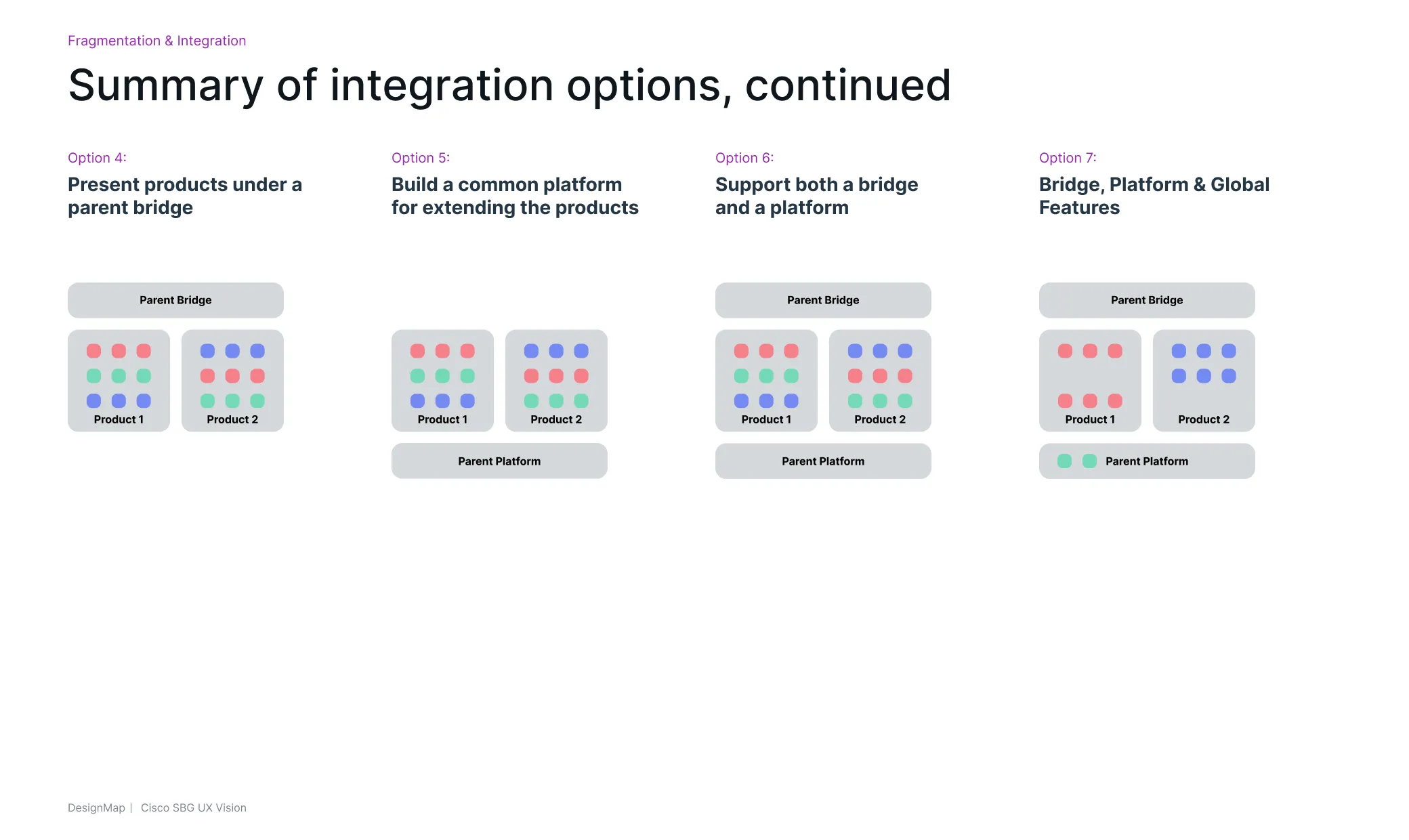
Once we’d mapped the portfolio and synthesized the stakeholder conversations, we explored several architectural directions for how integration might work. We generated seven distinct options — ranging from lightweight visual bridges between existing products all the way to a fully unified platform — and pressure-tested each one against what we’d heard.
Slide 1 of 4
Our Recommendation
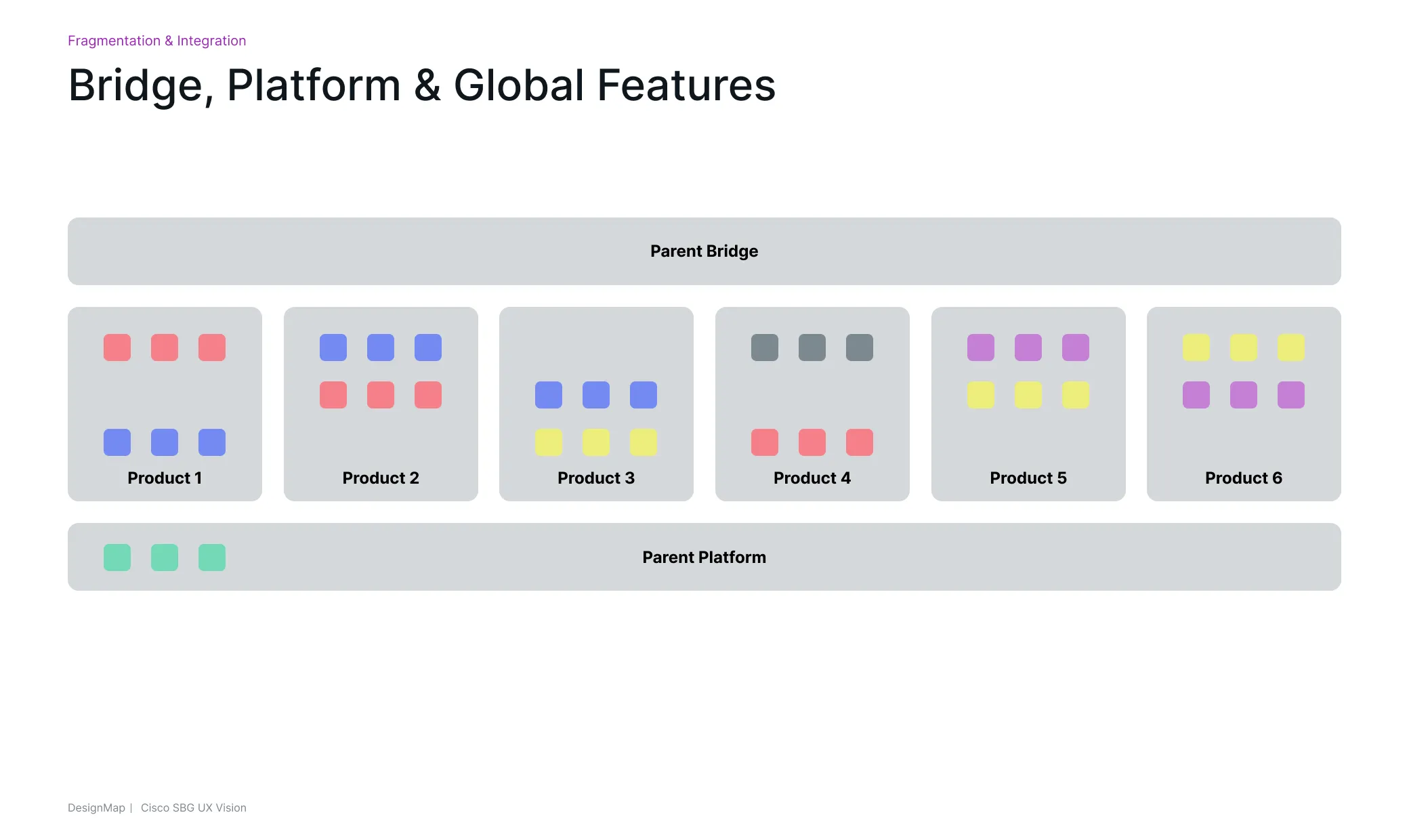
Platform
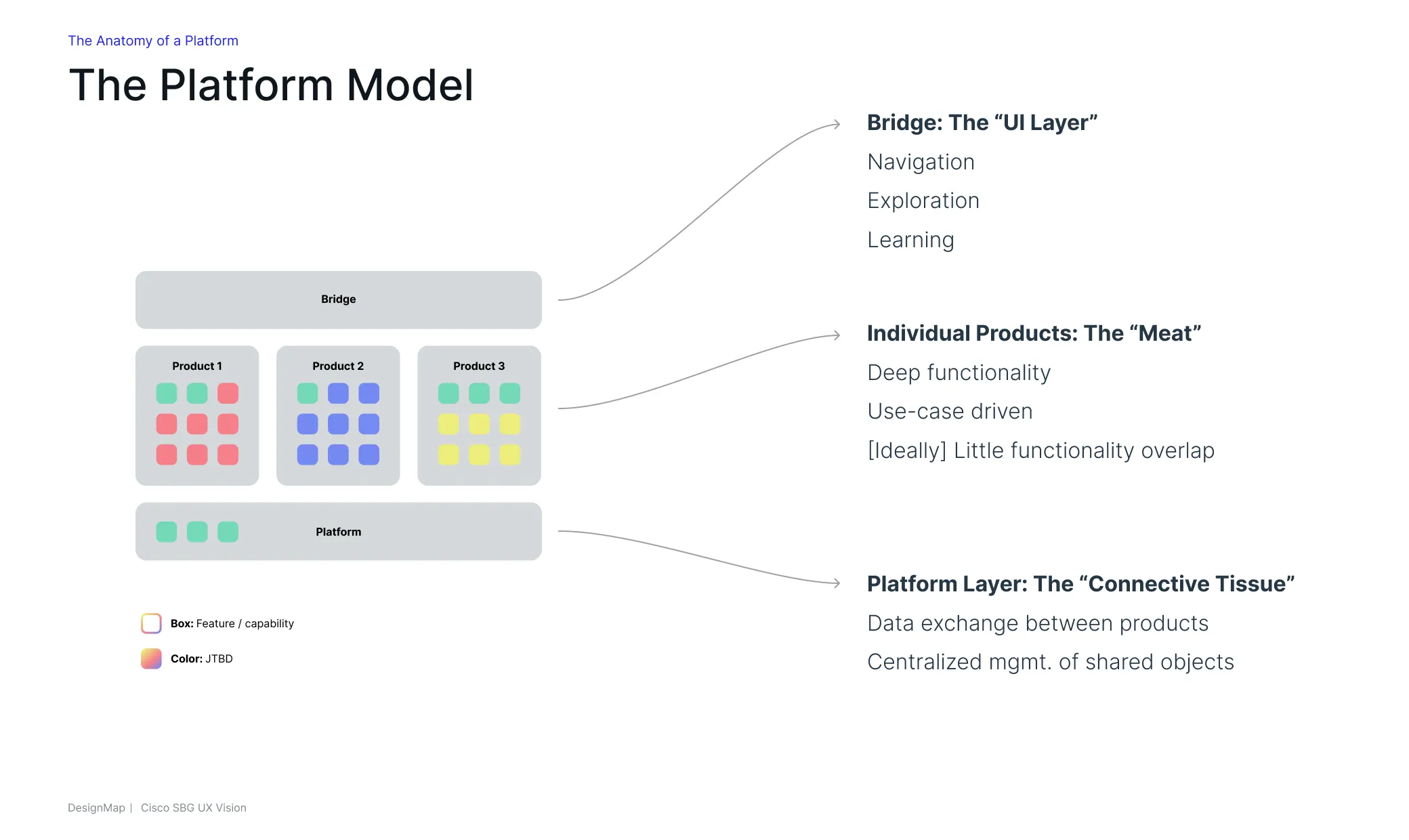
Shared infrastructure running beneath all products. A single source of truth for users, devices, networks, applications, and policies. Not a new product that customers interact with directly, but an invisible backbone. Things like SSO, user configuration, network configuration, endpoint configuration, and a shared policy engine all live here — defined once, accessible everywhere.
Bridge
The connective tissue between products. A shared navigation layer that keeps the rest of the portfolio one click away. Portfolio exploration, product education, and seamless app-to-app navigation. The thing that makes each product feel like it’s part of the same family.
Global Features
Capabilities that span all products. This is where most of the vision design work would live: a unified dashboard, a shared onboarding experience, and a platform-wide policy management system.
E.g.: User Configuration, Network Configuration, Endpoint Configuration, Policy Engine, SSO
Information Architecture
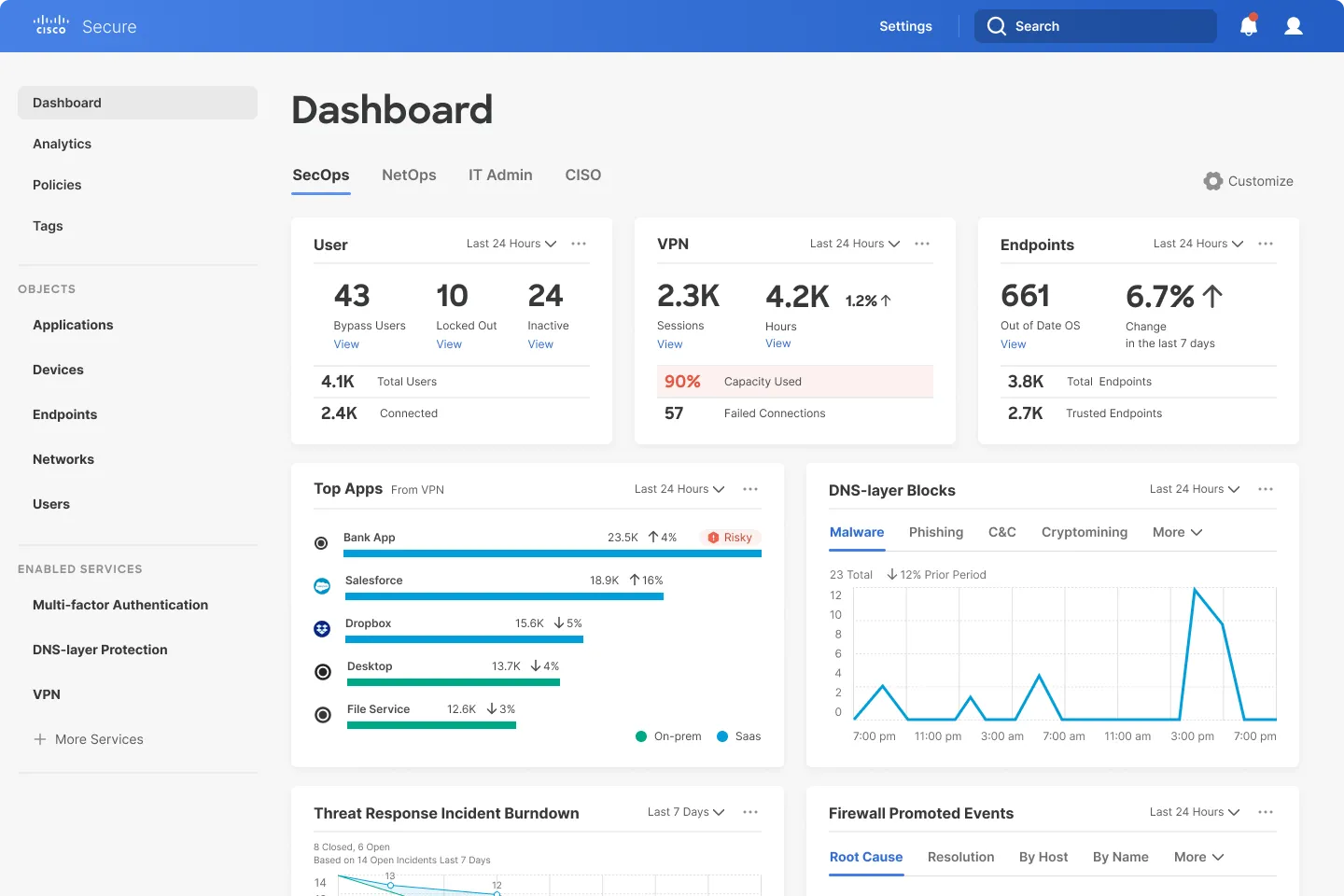
The platform’s information architecture is expressed through the left navigation — three buckets that reflect how the system thinks, not just how it’s organized. Each one carries a design argument.
01
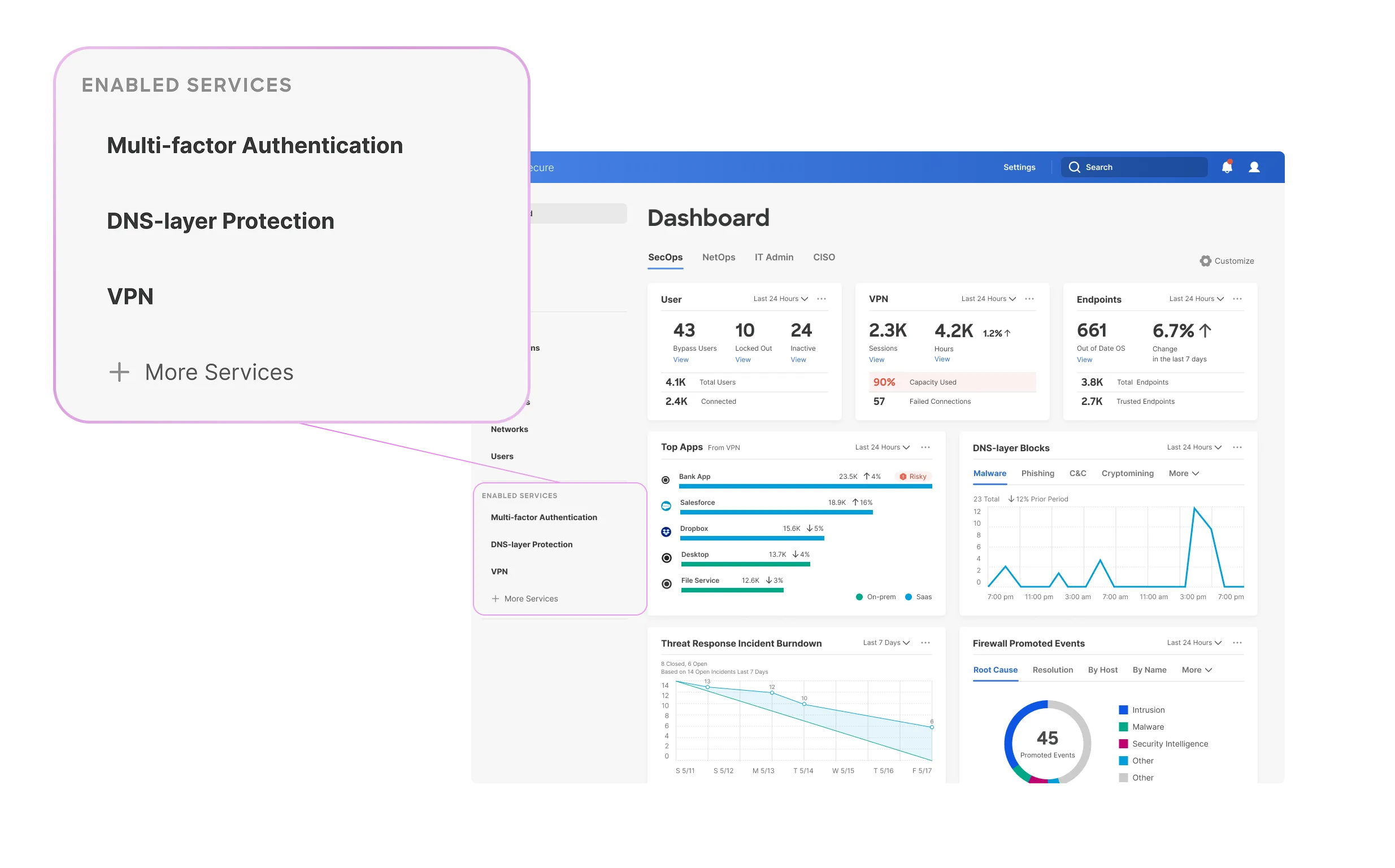
Enabled Services
Rather than presenting users with a portfolio of separate products, the platform presents a single tool with a range of capabilities built in. What was historically a lineup of individual security products — Duo, Umbrella, Secure Endpoint — becomes a set of services the user has switched on within one surface. Users can see what they’ve enabled, manage each service, and discover additional capabilities, all in one surface.
02
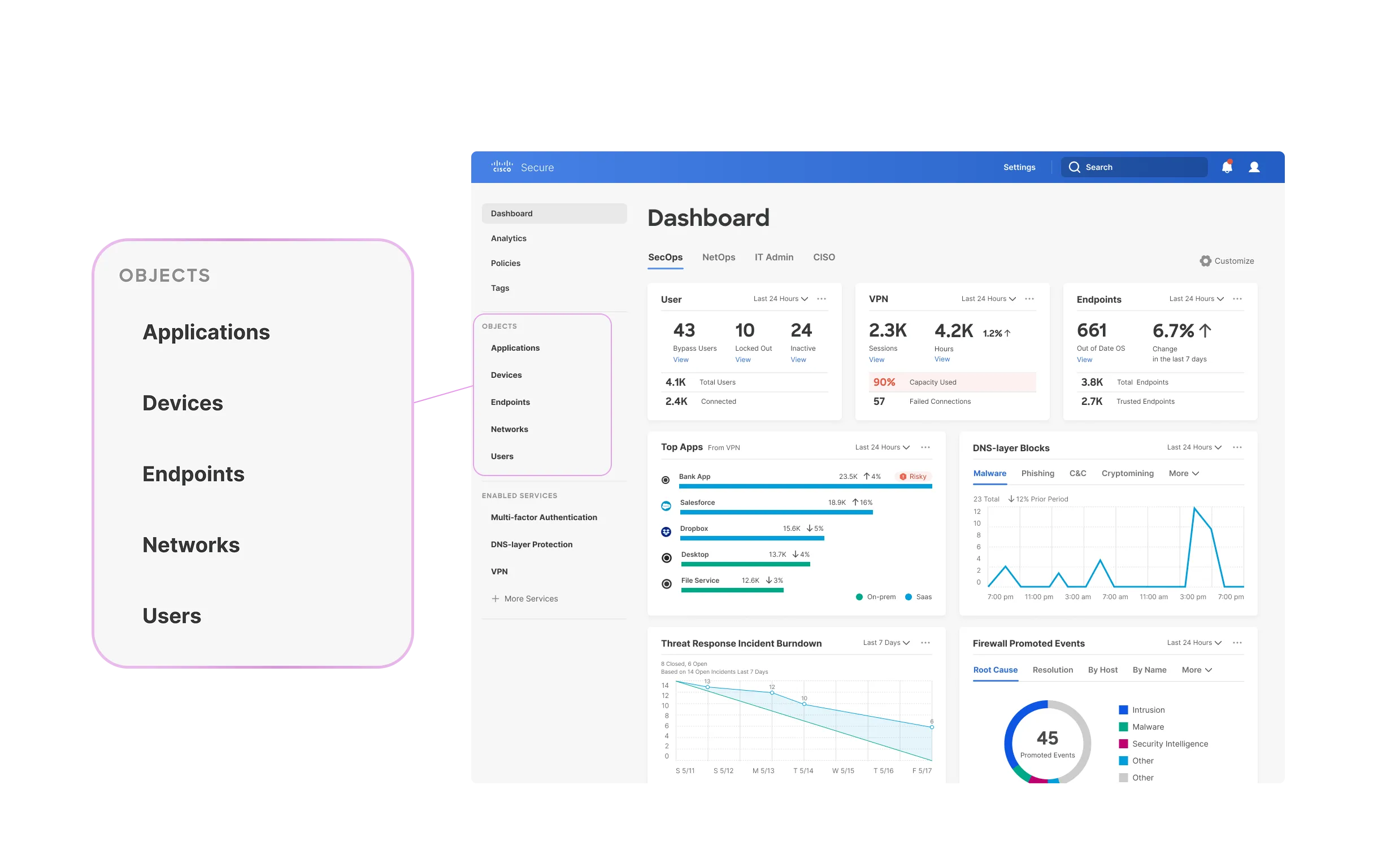
Objects
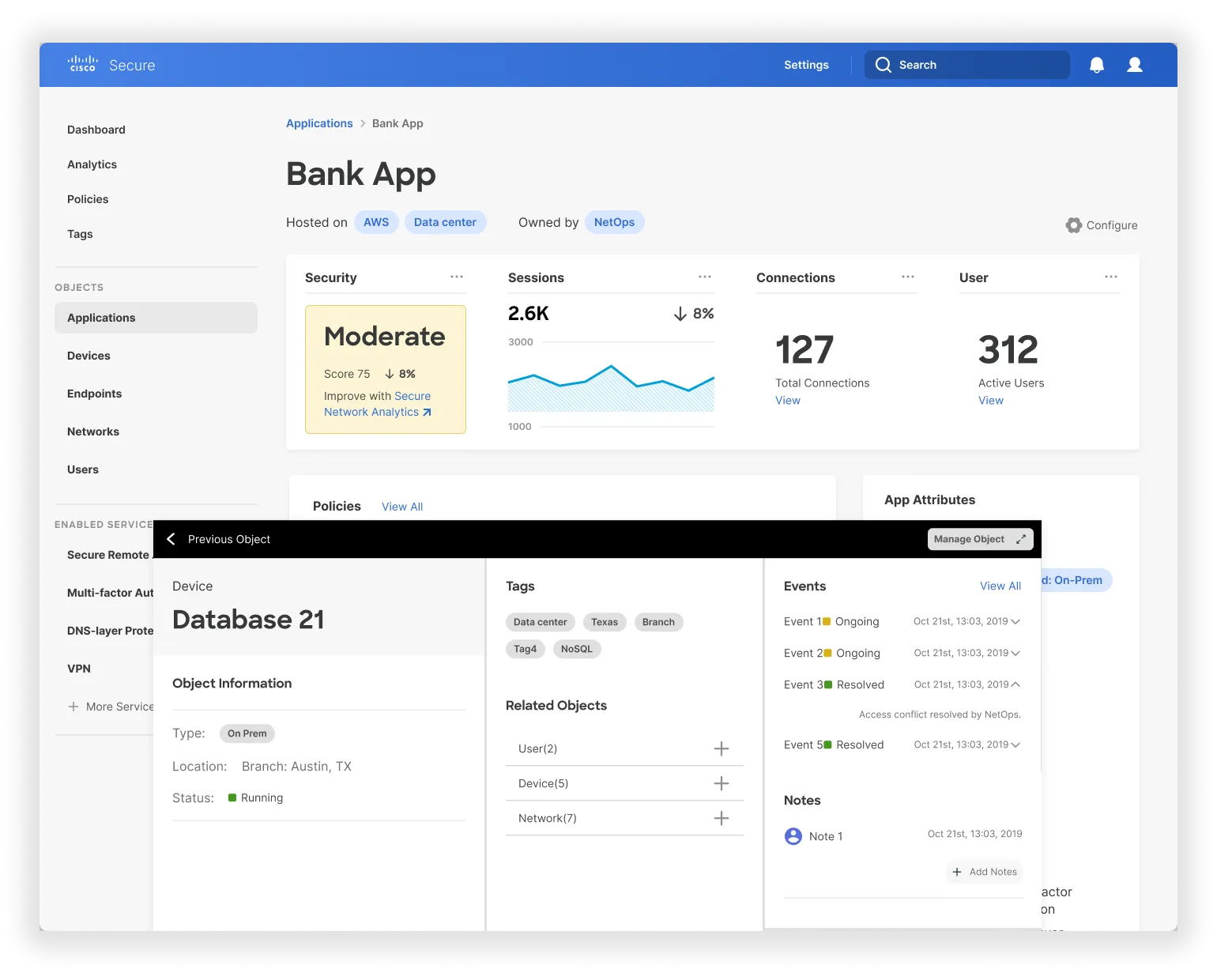
The Objects section is where users define and manage the things the platform exists to protect: users, devices, applications, and networks. Every enabled service references the same canonical objects rather than maintaining its own siloed list, which means security analysts aren’t re-entering the same configuration across multiple products. It also means the mental model is consistent: a “user” means the same thing everywhere in the platform.
03
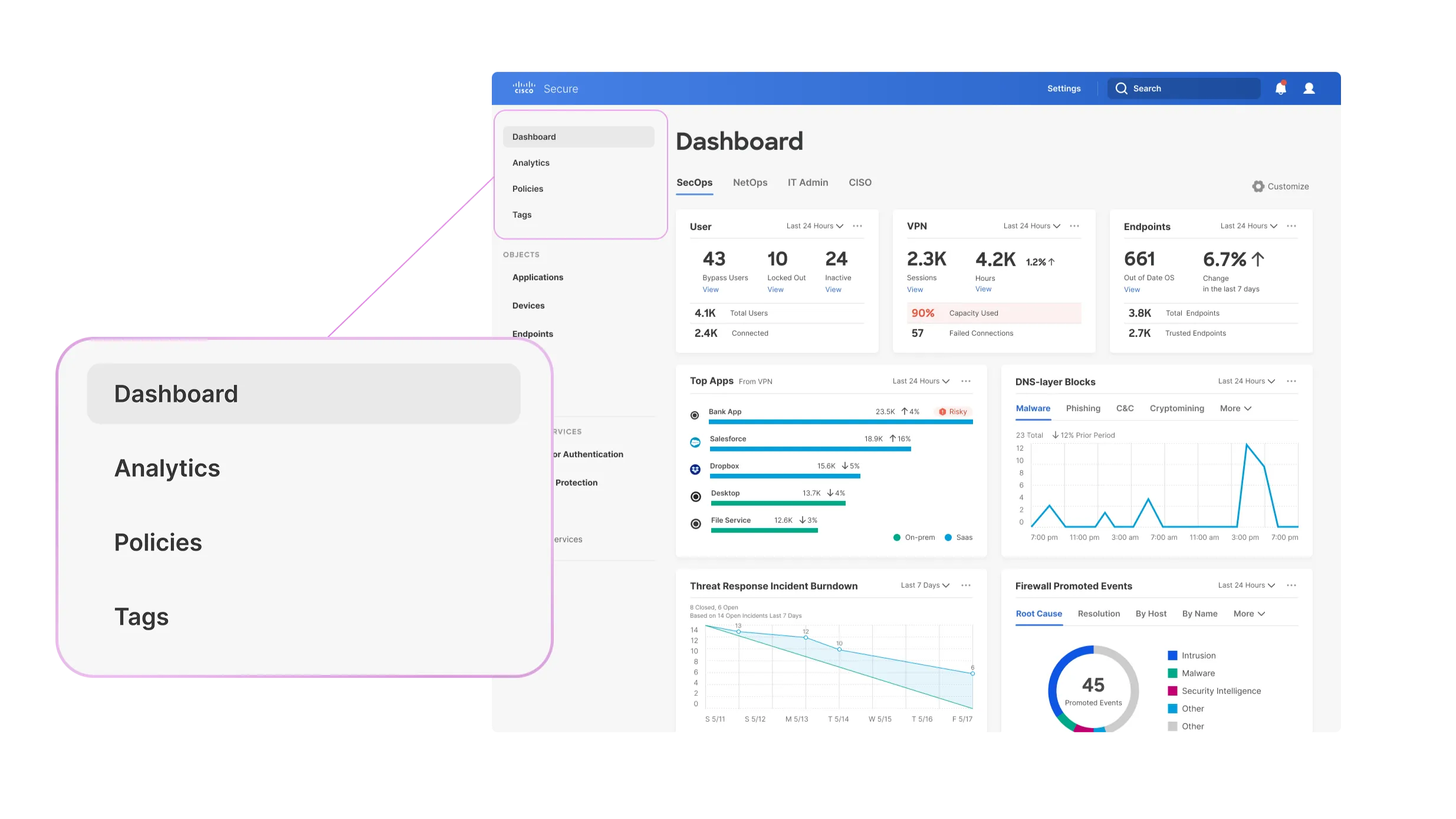
Reporting & Actions
At the top of the navigation sit the cross-cutting actions: Dashboard, Analytics, Policies, and Tags. These are the tools users reach for to take action and track the state of their security environment — and because they sit at the platform level, they work across every enabled service at once rather than being buried inside each one separately.
The Vision
With the framework established, we moved into designing what the experience would actually look like. Rather than designing a series of disconnected screens, we built the vision around a single user narrative:
The Vision
Platform Intelligence
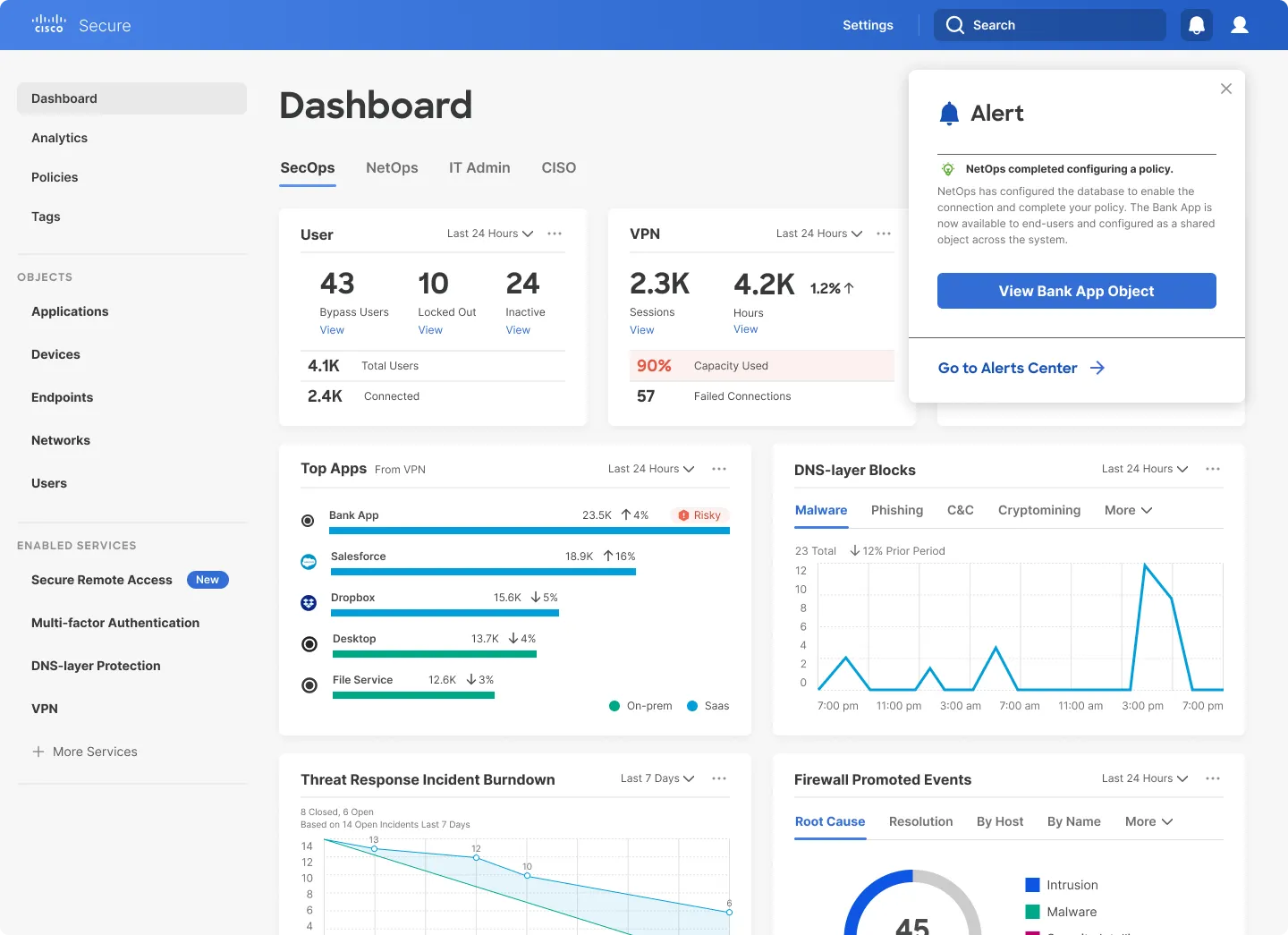
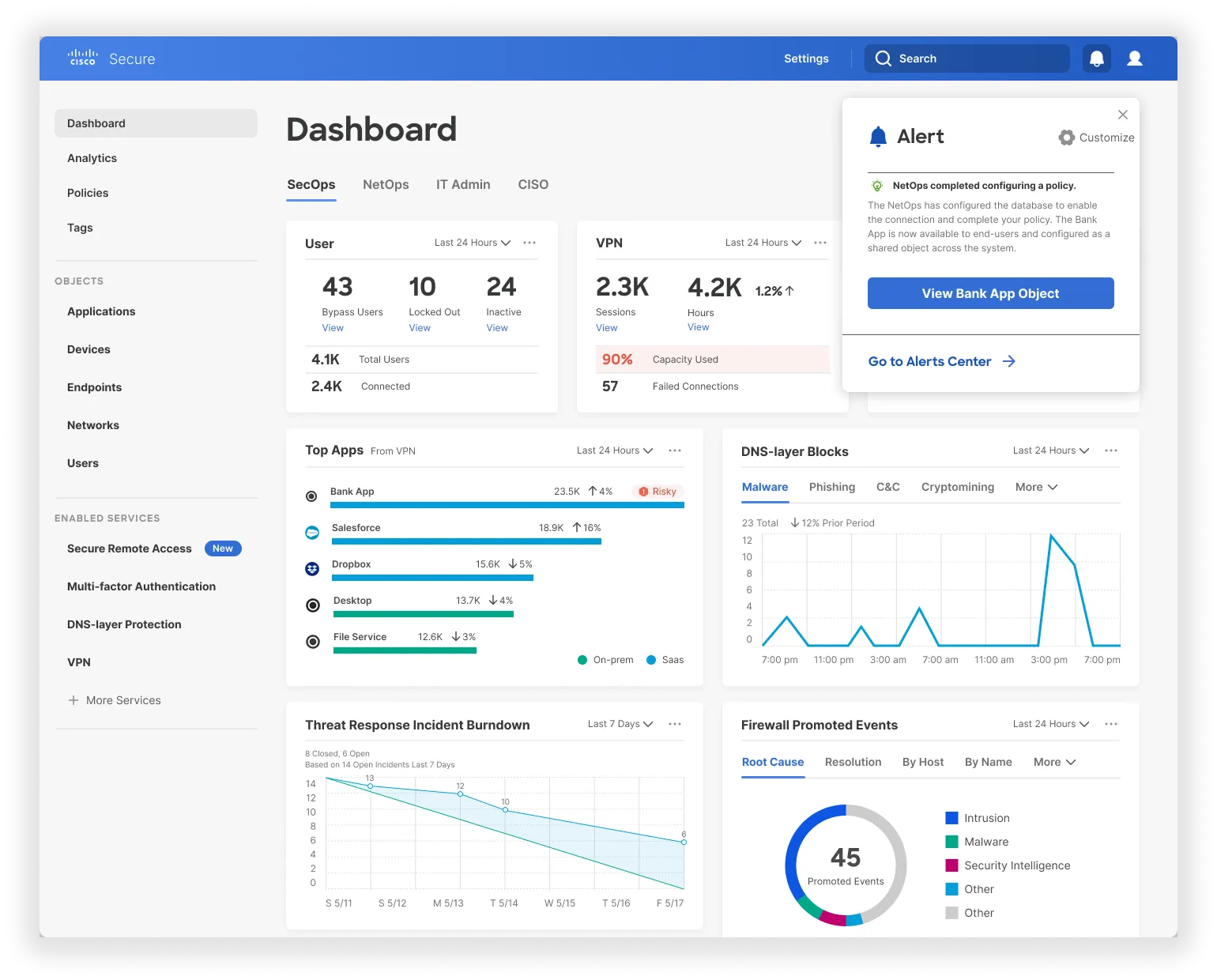
An AI-driven recommendation layer detects that Sam’s VPN is at 90% capacity and suggests enabling Secure Remote Access. Rather than generic marketing copy, it shows Sam projected impact data specific to his organization. This is a novel solution to a problem that both relieves strain on the VPN, and increases security of the Bank App asset.
This is the difference between a platform that aggregates data and one that actually uses it. The system already knows Sam’s environment — the scale of his user base, his current VPN load, and which services he has active. Platform Intelligence uses that context to make specific, relevant recommendations rather than generic alerts.
The Vision
Onboarding that Carries Context
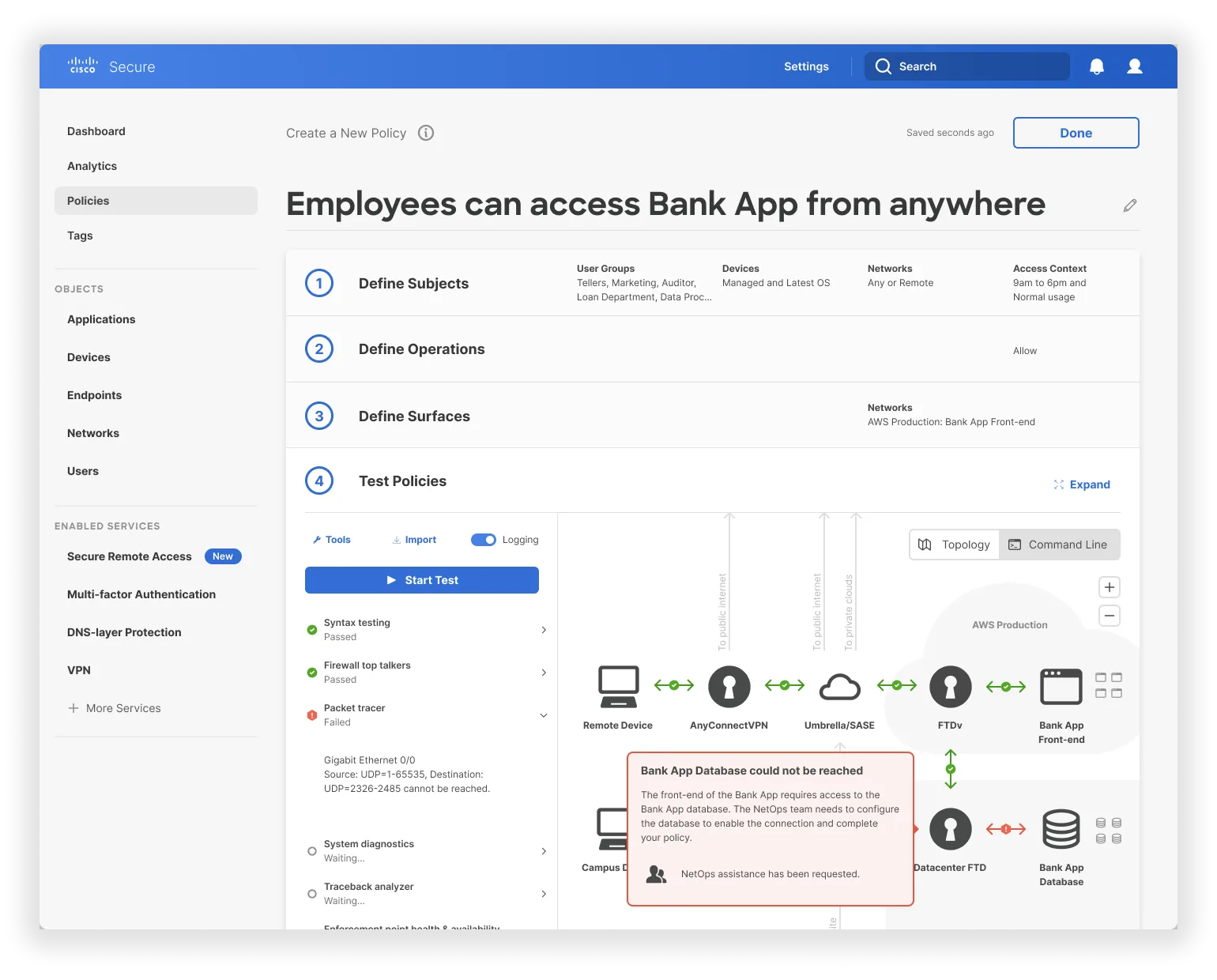
When Sam activates the service, his configurations follow him in, meaning that he gets a huge head start on creating policy in this new service. Activating a new security service shouldn’t feel like a migration project. When services work together, setup can be done in a snap.
More coming soon…